

Comparison
EcoFlow RIVER 3 vs Jackery Explorer 300
Check the Generation
Compare the exact RIVER 3 and original Explorer 300: battery life, USB-C direction, runtime estimates, solar cables and Plus/v2 traps to check before buying.
By thisWATT EditorialUpdated November 3, 20268 min read
On this page · Quick picks
Choose the standard EcoFlow RIVER 3 for frequent small-load use, subject to finding the exact US model: its LFP battery, 100W USB-C output and claimed one-hour wall recharge are the reasons. Keep an original Explorer 300 if its 300W AC output, 60W bidirectional USB-C and 293.8Wh capacity already meet your needs. For a new purchase, check the generation first: RIVER 3 Plus and Explorer 300 v2 are separate stations.
Quick picks
- Frequent laptop-and-light use: RIVER 3 has the stronger stated cycle rating at the same remaining-capacity endpoint. Confirm the exact model and stock before ordering.
- Already own an original Explorer 300: keep it if the extra nominal energy and USB-C input suit your routine. It remains a generation reference here; we have not confirmed a current new US offer.
- Need more AC power: choose RIVER 3 Plus for 600W continuous output rather than the base model's 300W.
- Want USB-C input with LFP: consider Explorer 300 v2, which combines those features. Treat it as a conditional alternative until its exact listing and availability are confirmed.
This is a specification comparison, not a confirmation of stock or a complete-kit offer. For the broader lineup, use the RIVER family guide.
Compare the exact US base models
The table uses the RIVER 3 manual, original Explorer 300 manual and Jackery's official support data.
Standard RIVER 3, US
- Chemistry
- LFP / LiFePO4
- Continuous AC, shared total
- 300W, 120V/60Hz
- Nominal energy
- 245Wh
All specifications
- Cycle rating
- 3,000 cycles to at least 80% capacity
- Higher-power claim
- 600W X-Boost appliance support; not the continuous rating
- USB-C
- 100W output; no USB-C charging input listed
- Solar specification
- 110W maximum, 11–30V, 8A
- Full wall recharge, maker claim
- One hour
- AC while charging
- 300W bypass total
- Weight
- About 7.72 lb
Original Explorer 300, US
- Chemistry
- NCM lithium-ion
- Continuous AC, shared total
- 300W, 110V/60Hz, two outlets
- Nominal energy
- 293.8Wh
All specifications
- Cycle rating
- 800 cycles to at least 80% capacity
- Higher-power claim
- 500W surge peak; not continuous
- USB-C
- 60W output; 20V/3A input
- Solar specification
- Support specifies 12.6–22V, 3–7A, DC7909 connector
- Full wall recharge, maker claim
- Around 4.5 hours using the wall adapter
- AC while charging
- 200W maximum per support table
- Weight
- About 7.1 lb
Full comparison table
Swipe to compare. Row labels stay visible.
| Specification | Standard RIVER 3, US | Original Explorer 300, US |
|---|---|---|
| Nominal energy | 245Wh | 293.8Wh |
| Chemistry | LFP / LiFePO4 | NCM lithium-ion |
| Cycle rating | 3,000 cycles to at least 80% capacity | 800 cycles to at least 80% capacity |
| Continuous AC, shared total | 300W, 120V/60Hz | 300W, 110V/60Hz, two outlets |
| Higher-power claim | 600W X-Boost appliance support; not the continuous rating | 500W surge peak; not continuous |
| USB-C | 100W output; no USB-C charging input listed | 60W output; 20V/3A input |
| Solar specification | 110W maximum, 11–30V, 8A | Support specifies 12.6–22V, 3–7A, DC7909 connector |
| Full wall recharge, maker claim | One hour | Around 4.5 hours using the wall adapter |
| AC while charging | 300W bypass total | 200W maximum per support table |
| Weight | About 7.72 lb | About 7.1 lb |
Scroll horizontally to see every column
| Specification | Standard RIVER 3, US | Original Explorer 300, US |
|---|---|---|
| Nominal energy | 245Wh | 293.8Wh |
| Chemistry | LFP / LiFePO4 | NCM lithium-ion |
| Cycle rating | 3,000 cycles to at least 80% capacity | 800 cycles to at least 80% capacity |
| Continuous AC, shared total | 300W, 120V/60Hz | 300W, 110V/60Hz, two outlets |
| Higher-power claim | 600W X-Boost appliance support; not the continuous rating | 500W surge peak; not continuous |
| USB-C | 100W output; no USB-C charging input listed | 60W output; 20V/3A input |
| Solar specification | 110W maximum, 11–30V, 8A | Support specifies 12.6–22V, 3–7A, DC7909 connector |
| Full wall recharge, maker claim | One hour | Around 4.5 hours using the wall adapter |
| AC while charging | 300W bypass total | 200W maximum per support table |
| Weight | About 7.72 lb | About 7.1 lb |
Jackery's manual specification says 293.8Wh, while its runtime formula uses 293Wh; our estimates below use the specification-table figure. EcoFlow qualifies its cycle figure at 25°C with 0.5C charging and discharging. These are maker ratings, not comparative endurance results from thisWATT.
Source: official manuals linked above
Best base model for frequent use: EcoFlow RIVER 3
The RIVER 3's higher stated cycle count makes it our preference for regular use. Its 100W USB-C output also offers more headroom than the original Jackery's 60W port. Choose it for a compatible laptop and small accessories after checking their actual power requirements.
The limit remains 300W continuous AC; EcoFlow's 600W X-Boost wording describes supported appliances in a separate mode. X-Boost is unavailable in bypass mode. For a purchase decision, use the continuous rating and confirm the appliance's starting demand rather than planning around a boost label.
A listing labelled RIVER 3 (230) is a different 230Wh version. Check the complete model label instead of treating all family listings as equivalent. Check the model at EcoFlow.
Keep-if-owned reference: original Jackery Explorer 300
The original Jackery has more nominal energy and weighs slightly less than the standard RIVER 3. Its bidirectional USB-C port accepts 20V/3A input, or 60W by multiplication. That makes keeping a working unit a reasonable choice when your charging setup already suits it.
It uses NCM lithium-ion cells, with an official rating of 800 cycles to at least 80% capacity. Its manual explicitly rules out UPS use. Jackery's support table also limits AC output to 200W during simultaneous charging and discharging. Do not apply the standalone inverter rating to every charging situation.
Use this generation reference to identify an existing unit or check an older listing. Read the original manual before matching a replacement charging lead.
Upgrade pick: EcoFlow RIVER 3 Plus
The Plus changes the decision with 286Wh, 600W continuous AC and 220W maximum solar input. RIVER 3 Max means Plus with an EB300 battery; Max Plus uses an EB600, reaching 572Wh and 858Wh total respectively. Those expansion options are specified for the Plus. Do not buy an extra battery assuming the ordinary RIVER accepts it.
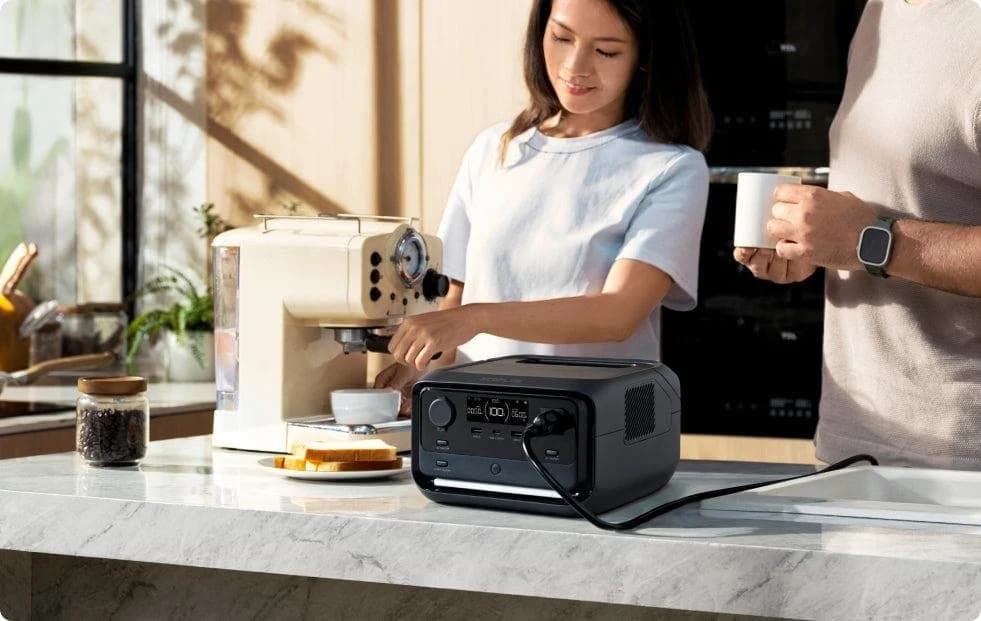
EcoFlow
A 10.4 lb, 286Wh LiFePO4 power station with 600W of AC output, a sub-10 ms UPS switchover, one-hour wall charging and expansion to 858Wh with a stackable extra battery.
Check package and model options
- 286 Wh capacity
- 600 W AC out
- LiFePO4
The Plus manual specifies transfer within 10ms; the family marketing page says under 10ms. For equipment sensitive to interruptions, confirm compatibility with the equipment maker. Check price on Amazon.
Explorer 300 v2 is another generation
Jackery's v2 has 288Wh LFP, 300W continuous AC, a 100W USB-C input/output and a separate 15W USB-C output. Its rating is 4,000 cycles to at least 70%, a different endpoint from the original's 80%. Avoid comparing those cycle counts as equivalent endurance claims.
The v2 support page specifies 100W solar at 16–28V/6A with a DC8020 connector. The original uses DC7909, so its cable specification must not be carried over. Jackery's support page says v2 battery packs are unsupported. Check the v2 specifications and confirm an available US package before choosing it.
Laptop and lights: comparable runtime estimates
Use the same assumptions for both base models. Jackery publishes capacity × 0.85 ÷ device watts as an estimate. Its original-model support table separately lists 5W standby consumption. We apply that allowance to both stations for this illustration; it is not a measured RIVER idle draw. The efficiency factor is also an assumption for the RIVER, not an EcoFlow performance claim.
Our estimate in hours = nominal Wh × 0.85 ÷ (device watts + 5W assumed station draw). For a hypothetical steady 30W laptop: (245Wh × 0.85) ÷ (30W + 5W) is about 6 hours, rounded.
30W laptop
- RIVER 3 estimate (hours)
- About 6
- Original Explorer 300 estimate (hours)
- About 7
10W LED lights
- RIVER 3 estimate (hours)
- About 14
- Original Explorer 300 estimate (hours)
- About 17
Both together, 40W
- RIVER 3 estimate (hours)
- About 5
- Original Explorer 300 estimate (hours)
- About 6
Full comparison table
Swipe to compare. Row labels stay visible.
| Assumed steady AC load | RIVER 3 estimate (hours) | Original Explorer 300 estimate (hours) |
|---|---|---|
| 30W laptop | About 6 | About 7 |
| 10W LED lights | About 14 | About 17 |
| Both together, 40W | About 5 | About 6 |
Scroll horizontally to see every column
| Assumed steady AC load | RIVER 3 estimate (hours) | Original Explorer 300 estimate (hours) |
|---|---|---|
| 30W laptop | About 6 | About 7 |
| 10W LED lights | About 14 | About 17 |
| Both together, 40W | About 5 | About 6 |
These are rounded planning estimates, not promises; battery age, conversion losses, idle draw and changing loads affect the result. Reserve extra energy for essential use. Do not treat this AC calculation as a measured USB-C runtime comparison.
The original Jackery manual says it switches off after 12 hours below 10W. EcoFlow warns that AC timeout can affect intermittent loads and provides an app setting to prevent that timeout. Check low-load settings before relying on overnight lighting.
Buying advice: ports, solar, winter and the actual kit
Both base models share a 300W AC ceiling across their sockets. Add all simultaneously running loads, then check startup needs separately. The station buying guide is the better next step if that ceiling or the estimated runtime is insufficient.
- Yes: Standard RIVER 3: USB-C can power a compatible device
- No: Standard RIVER 3: USB-C is not listed as a station-charging input
- Yes: Original Explorer 300: USB-C supports input and output
- Yes: Explorer 300 v2: USB-C1 supports input and output; USB-C2 is output
Port maxima do not establish that every port can sustain its individual maximum simultaneously. Check the total output budget and the laptop's accepted charging profile; a laptop cable is a separate item to verify in the order.
Solar: the RIVER manual lists 11–30V/8A and 110W maximum, and separately requires panel output below 30V. Its base package excludes the panel and solar-to-XT60i cable. For the original Jackery, support specifies 12.6–22V/3–7A solar input. The original manual recommends one SolarSaga 100 and estimates around 5.5 hours, depending on weather. That is a specified example, not a winter recharge promise. See panel matching advice before buying a separate panel.
Winter: RIVER's charging range is 0–45°C; its discharge range is −10–45°C. Jackery's original manual says charge at 0–35°C and discharge at −10–40°C, but its support table says 0–40°C and −10–35°C respectively. Use the overlapping limits—charge at 0–35°C, discharge at −10–35°C—pending clarification from Jackery. Being able to discharge in cold weather does not establish permission to recharge there.
Warranty: EcoFlow's US policy lists 24 months for RIVER 3 and 60 months for Plus. It requires proof from an authorized seller and the product serial number when claiming. The original Jackery manual states 24 months, rising to 36 after registration, for the original consumer buyer. It also requires a full battery charge within seven days of purchase and at least every three months thereafter for battery-cell coverage. Jackery's current registration guidance says to check model-specific terms. Confirm eligibility for your seller and condition before paying.
Black Friday and Cyber Monday listing checks
Use the same checks during either promotion; a banner is not evidence that the selected generation or accessories match this comparison.
Match the station
Confirm the full generation name, US outlets and new or refurbished condition.
Match the charging kit
Check the panel, connector, wall adapter and every required lead against the selected package.
Match the seller
Confirm authorization, warranty eligibility and return terms for the actual order.
The original manual lists a car lead plus a wall adapter and AC cable. The v2 support page instead lists an AC cable, manuals and a solar connection guide. Confirm any missing car or solar lead separately. We do not name a current complete-kit winner because we could not verify an orderable, fully specified offer from the fetched official sources.
How we choose
We compared US specifications, manuals and official support documents, checked November 2, 2026. The judgments weigh load fit, charging direction, stated cycle endpoints and required accessories. This is document research; we have not physically evaluated these stations. Availability remains unconfirmed, and the original Explorer is retained for identification and existing owners.
Verdict
Prefer the standard RIVER 3 for regular use and quick wall refills; keep an original Explorer 300 when its capacity and USB-C input already work for you. Choose Plus for higher continuous AC output, or investigate v2 for LFP with USB-C input. Verify the exact package before ordering. Use the RIVER family guide when the decision includes other RIVER variants or extra batteries.
Frequently asked questions
Is EcoFlow RIVER 3 better than the original Jackery Explorer 300?
For frequent use, we prefer the RIVER 3's stated 3,000 cycles to at least 80% capacity over the original Jackery's 800 cycles to that endpoint. Its USB-C output also reaches 100W. The original Explorer 300 counters with 293.8Wh versus 245Wh and USB-C charging input, so keeping a working one can make more sense than replacing it.
Can I charge an EcoFlow RIVER 3 through USB-C?
The standard RIVER 3 manual lists USB-C as a 100W output; its charging inputs are AC and solar/car. Do not plan to refill it with a laptop's USB-C charger. The original Explorer 300 accepts USB-C input at 20V and 3A, equivalent to 60W, while Jackery's Explorer 300 v2 support page specifies a 100W USB-C input.
Can either base model run a computer as a UPS?
The original Explorer 300 manual explicitly says it cannot serve as a UPS. The ordinary RIVER 3 has EPS transfer within 20ms, and its manual warns against connecting equipment requiring uninterrupted power, including desktops and NAS devices. A separately named RIVER 3 10ms variant and the RIVER 3 Plus differ; the Plus manual specifies transfer within 10ms. Confirm your equipment's requirements before choosing.
Does a solar generator bundle include everything needed?
Check the exact selected package. The standard RIVER 3 and Plus manuals say the solar panel and solar-to-XT60i cable are excluded from their base packages. The original Explorer 300 manual lists its wall adapter/cable and vehicle lead. The v2 support page lists an AC cable, manuals and a solar connection guide; a guide is not a solar panel or charging lead.
Related guides
Comparison · Portable Power Stations
Anker SOLIX C2000 Gen 2 vs Jackery Explorer 2000 v2: Which to Buy?
Compare Anker C2000 Gen 2 and Jackery 2000 v2 for fridge backup, carrying, expansion and solar. Get runtime estimates, complete kit checks and buying picks.
Comparison · Portable Power Stations
Anker SOLIX C300X vs BLUETTI Elite 30 V2: Which Small Station?
Choose C300X or Elite 30 V2 for laptops, lights and small AC loads: compare USB-C sharing, runtime estimates, solar cables, model aliases and gift return traps.
Comparison · Portable Power Stations
AFERIY P280 vs Anker SOLIX C2000 Gen 2: Which Backup Kit Fits?

Compare the US AFERIY P280 and Anker C2000 Gen 2 for fridge backup: matching battery kits, runtime estimates, outlet limits, recharge needs and warranty gaps.