

Comparison
DJI Power 1000 vs Power 1000 V2
Output, Expansion and Cables
Choose the right DJI Power 1000 generation with continuous output explained, matched solar and expansion kits, required cables and equal-load runtime estimates.
By thisWATT EditorialUpdated November 3, 20268 min read
On this page · Quick picks: choose the complete kit
For a new kit, DJI Power 1000 V2 is our specification pick: DJI rates it at 2,600 W continuous, compared with the original's 2,200 W maximum continuous output. Keep the original if it already covers your loads: both store 1,024 Wh, both support expansion, and the original's advertised 2,600 W is a brief operating limit rather than its continuous rating. (Original specs, generation-specific output footnote.)
- 1,024 WhNominal capacity of either bare station
- 2,200 WOriginal: maximum continuous output, with qualifications below
- 2,600 WV2: maximum continuous output, per DJI
Quick picks: choose the complete kit
Compare specifications and all conditions
Starting fresh; need more running power
- Our pick
- V2, subject to US availability
- What to include
- Station, correct regional AC cable and the accessories your charging route needs
Original already runs everything
- Our pick
- Keep Power 1000
- What to include
- Add capacity or charging accessories only when they solve a specific shortfall
Either station runs out too soon
- Our pick
- Expansion Battery 2000
- What to include
- Battery plus its included expansion cable; original also needs a firmware update
Air 3 / Air 3S field charging
- Our pick
- Either generation
- What to include
- The matching Air 3 Series SDC fast-charge cable; optional, not assumed in the station box
Full comparison table
Swipe to compare. Row labels stay visible.
| Your situation | Our pick | What to include |
|---|---|---|
| Starting fresh; need more running power | V2, subject to US availability | Station, correct regional AC cable and the accessories your charging route needs |
| Original already runs everything | Keep Power 1000 | Add capacity or charging accessories only when they solve a specific shortfall |
| Either station runs out too soon | Expansion Battery 2000 | Battery plus its included expansion cable; original also needs a firmware update |
| Air 3 / Air 3S field charging | Either generation | The matching Air 3 Series SDC fast-charge cable; optional, not assumed in the station box |
Scroll horizontally to see every column
| Your situation | Our pick | What to include |
|---|---|---|
| Starting fresh; need more running power | V2, subject to US availability | Station, correct regional AC cable and the accessories your charging route needs |
| Original already runs everything | Keep Power 1000 | Add capacity or charging accessories only when they solve a specific shortfall |
| Either station runs out too soon | Expansion Battery 2000 | Battery plus its included expansion cable; original also needs a firmware update |
| Air 3 / Air 3S field charging | Either generation | The matching Air 3 Series SDC fast-charge cable; optional, not assumed in the station box |
Availability checked November 2, 2026: DJI's fetched US store pages marked both standalone stations, the expansion battery and the MPPT module out of stock. Confirm availability before buying. For alternatives, see our six-brand station comparison. (Original, V2, battery, module.)
Identify the US generation before comparing
The original spec sheet identifies DYM1000L as 100–120 V and DYM1000H as 220–240 V. The low-voltage family also covers Japan, with a different continuous limit, so the code alone does not identify a US listing. Confirm US sockets and the electrical label. (DJI specs.)
For V2, confirm the full Power 1000 V2 name and US outlets. Its US page lacks a complete regional spec table; electrical model code, outlet count, peak and bypass ratings remain unverified here. Do not substitute the original's or another country's figures.
Original vs V2: the differences that matter
Original Power 1000
- Nominal capacity / chemistry
- 1,024 Wh / LFP
- Maximum continuous AC, station alone
- 2,200 W; manual qualification below
- Continuous AC with expansion battery
- 2,400 W at 25°C
All specifications
- Expansion
- Up to five × 2,048 Wh; 11,264 Wh total
- Time-limited / peak output
- 2,600 W for about 30 seconds on DYM1000L; 4,400 W peak
- USB-C
- Two ports, up to 140 W each
- Quoted UPS transfer
- Within 0.02 seconds (20 ms)
- Advertised wall recharge
- About 70 minutes full; 50 minutes to 80%
Power 1000 V2
- Nominal capacity / chemistry
- 1,024 Wh / LFP
- Maximum continuous AC, station alone
- 2,600 W at 25°C
- Continuous AC with expansion battery
- 3,000 W at 25°C
All specifications
- Expansion
- Up to five × 2,048 Wh; 11,264 Wh total
- Time-limited / peak output
- Separate US peak figure unverified here
- USB-C
- Two ports, up to 140 W each
- Quoted UPS transfer
- 10 ms
- Advertised wall recharge
- 56 minutes full; 37 minutes to 80%
Full comparison table
Swipe to compare. Row labels stay visible.
| Specification | Original Power 1000 | Power 1000 V2 |
|---|---|---|
| Nominal capacity / chemistry | 1,024 Wh / LFP | 1,024 Wh / LFP |
| Maximum continuous AC, station alone | 2,200 W; manual qualification below | 2,600 W at 25°C |
| Time-limited / peak output | 2,600 W for about 30 seconds on DYM1000L; 4,400 W peak | Separate US peak figure unverified here |
| Continuous AC with expansion battery | 2,400 W at 25°C | 3,000 W at 25°C |
| USB-C | Two ports, up to 140 W each | Two ports, up to 140 W each |
| Quoted UPS transfer | Within 0.02 seconds (20 ms) | 10 ms |
| Advertised wall recharge | About 70 minutes full; 50 minutes to 80% | 56 minutes full; 37 minutes to 80% |
| Expansion | Up to five × 2,048 Wh; 11,264 Wh total | Up to five × 2,048 Wh; 11,264 Wh total |
Scroll horizontally to see every column
| Specification | Original Power 1000 | Power 1000 V2 |
|---|---|---|
| Nominal capacity / chemistry | 1,024 Wh / LFP | 1,024 Wh / LFP |
| Maximum continuous AC, station alone | 2,200 W; manual qualification below | 2,600 W at 25°C |
| Time-limited / peak output | 2,600 W for about 30 seconds on DYM1000L; 4,400 W peak | Separate US peak figure unverified here |
| Continuous AC with expansion battery | 2,400 W at 25°C | 3,000 W at 25°C |
| USB-C | Two ports, up to 140 W each | Two ports, up to 140 W each |
| Quoted UPS transfer | Within 0.02 seconds (20 ms) | 10 ms |
| Advertised wall recharge | About 70 minutes full; 50 minutes to 80% | 56 minutes full; 37 minutes to 80% |
| Expansion | Up to five × 2,048 Wh; 11,264 Wh total | Up to five × 2,048 Wh; 11,264 Wh total |
Sources: original specifications, original FAQ, US V2 listing and expansion page, including footnotes. These are manufacturer figures, not measurements by thisWATT.
The original's documents disagree on the continuous-output qualification. Its linked manual labels 1,800 W “Rated,” calls 2,200 W maximum continuous and limits that maximum to battery levels above 20%. The live spec page instead describes stable 2,200 W output until discharge at 25°C. Obtain clarification from DJI if sustained operation near the limit decides your purchase.
The original's 30-second claim was measured at approximately 25°C and 50% charge; duration varies with both. Its peak rating does not guarantee a particular compressor will start. (Output notes.)
Best new-kit target: Power 1000 V2
Choose V2 for its higher continuous output or faster advertised recharge. Both offer dual 140 W USB-C outputs; the original explicitly requires a PD 3.1 device and EPR-capable cable to reach that maximum. (V2, original.)
Check the US V2 listing at DJI. Confirm the regional specifications and box contents before ordering.
Best existing-owner choice: keep Power 1000
If runtime is the problem, the original accepts the same Expansion Battery 2000. One battery gives 1,024 + 2,048 = 3,072 Wh nominal, while DJI specifies 2,400 W continuous for that combination at 25°C. Update the original through wired DJI Assistant 2 before first use; DJI says V2 does not require that desktop connection for expansion. Its manual supports firmware updates through DJI Home. (Expansion requirements, V2 manual.)
The original standalone box lists the station and AC power cable. Treat a solar, car or drone bundle as a separate bill of materials, even when its listing photograph shows the same station.
Solar and cables: the matched accessory inventory
DJI's MPPT module page lists both generations as compatible. Its guide identifies the attached SDC cable and XT60 inputs.
Basic solar charging
- Add to the station
- One DJI Power Solar Panel Adapter Module (MPPT), compatible panel(s), suitable panel leads
- Connection / buying trap
- Panel → XT60 input on module → attached SDC cable → station SDC or SDC Lite; no separate SDC lead for the module
MC4-equipped panels
- Add to the station
- Suitable MC4-to-XT60 conversion as well
- Connection / buying trap
- V2 manual explicitly requires this cable for MC4 panels; verify polarity and panel limits before buying
Original's dual-module route
- Add to the station
- Two MPPT modules and matching panels/leads
- Connection / buying trap
- DJI permits two modules, each capped at 400 W: 800 W combined ceiling for this route
More stored energy, either generation
- Add to the station
- Expansion Battery 2000
- Connection / buying trap
- Its expansion cable is included; connect to SDC, not SDC Lite
Air 3 / Air 3S fast charging, either generation
- Add to the station
- DJI Power SDC to DJI Air 3 Series Fast Charge Cable
- Connection / buying trap
- Match the battery family; this is not the Mavic cable or a generic XT60 lead
Full comparison table
Swipe to compare. Row labels stay visible.
| Job | Add to the station | Connection / buying trap |
|---|---|---|
| Basic solar charging | One DJI Power Solar Panel Adapter Module (MPPT), compatible panel(s), suitable panel leads | Panel → XT60 input on module → attached SDC cable → station SDC or SDC Lite; no separate SDC lead for the module |
| MC4-equipped panels | Suitable MC4-to-XT60 conversion as well | V2 manual explicitly requires this cable for MC4 panels; verify polarity and panel limits before buying |
| Original's dual-module route | Two MPPT modules and matching panels/leads | DJI permits two modules, each capped at 400 W: 800 W combined ceiling for this route |
| More stored energy, either generation | Expansion Battery 2000 | Its expansion cable is included; connect to SDC, not SDC Lite |
| Air 3 / Air 3S fast charging, either generation | DJI Power SDC to DJI Air 3 Series Fast Charge Cable | Match the battery family; this is not the Mavic cable or a generic XT60 lead |
Scroll horizontally to see every column
| Job | Add to the station | Connection / buying trap |
|---|---|---|
| Basic solar charging | One DJI Power Solar Panel Adapter Module (MPPT), compatible panel(s), suitable panel leads | Panel → XT60 input on module → attached SDC cable → station SDC or SDC Lite; no separate SDC lead for the module |
| MC4-equipped panels | Suitable MC4-to-XT60 conversion as well | V2 manual explicitly requires this cable for MC4 panels; verify polarity and panel limits before buying |
| Original's dual-module route | Two MPPT modules and matching panels/leads | DJI permits two modules, each capped at 400 W: 800 W combined ceiling for this route |
| More stored energy, either generation | Expansion Battery 2000 | Its expansion cable is included; connect to SDC, not SDC Lite |
| Air 3 / Air 3S fast charging, either generation | DJI Power SDC to DJI Air 3 Series Fast Charge Cable | Match the battery family; this is not the Mavic cable or a generic XT60 lead |
See the original solar FAQ and V2 manual. A dual-module V2 total remains unverified here; its manual illustrates a 400 W module route.
Screen panels electrically, not just by watts. For other-brand panels, DJI requires open-circuit voltage below 30 V and limits each module input to 200 W, with 400 W total. The module guide additionally requires panel current below 10 A and says combined power must be below 400 W, while the store describes a 400 W cap. Follow the stricter wording when choosing third-party panels. The included metal brackets are required for heat dissipation. Our panel compatibility guide explains the checks to make. (Module specifications, guide.)
Higher-power solar is a different kit. DJI's 1.8kW Super Fast Car Charging Combo supports both stations. Its solar route combines up to 1,200 W on the MC4 input with another 600 W through the separately sold 1.8kW Super Fast Charger XT90 to MC4 Adapter Cable. DJI requires an expansion battery to reach 1,800 W with either station. The combo includes the SDC to SDC Adapter Cable (30A); do not confuse its higher-voltage inputs with the small MPPT module's limits. This makes 800 W a limit of the original's dual-module route, not a universal ceiling for every accessory configuration.
The combo page also describes expanded AC output as 2,400–2,600 W, conflicting with the battery page's explicit 3,000 W V2 footnote. Confirm that configuration's output with DJI if it decides your purchase.
Expansion and drone charging: port compatibility
The expansion FAQ and V2 manual reserve expansion for the station's SDC port. The battery guide forbids directly connecting a drone battery to the expansion battery with an SDC fast-charge cable. Confirm the intended port combination with DJI if you need expansion and direct drone charging together.
- Yes: Either generation supports Expansion Battery 2000 through SDC
- Yes: The MPPT module supports either generation
- No: SDC Lite does not support the expansion battery
- No: Expansion battery ports are not direct drone charging sockets
- Partly: Simultaneous accessories need a confirmed port arrangement
The Air 3 Series cable supports Air 3 and Air 3S, up to 125 W. DJI quotes approximately 30 minutes from 10% to 95%, requires current station firmware for Air 3S and advises letting a hot battery cool below 40°C. Do not apply that charging time to other drone batteries.
Equal-load outage and creator estimates
These loss-free upper-bound estimates use nominal capacity ÷ assumed constant load. Capacities are DJI's figures; loads are illustrative planning inputs, not appliance measurements.
100 W outage load
- Either bare station
- 1,024 Wh ÷ 100 W: roughly ten hours
- Either station + one expansion battery
- 3,072 Wh ÷ 100 W: roughly thirty-one hours
300 W creator load
- Either bare station
- 1,024 Wh ÷ 300 W: roughly three hours
- Either station + one expansion battery
- 3,072 Wh ÷ 300 W: roughly ten hours
Full comparison table
Swipe to compare. Row labels stay visible.
| Assumed steady load | Either bare station | Either station + one expansion battery |
|---|---|---|
| 100 W outage load | 1,024 Wh ÷ 100 W: roughly ten hours | 3,072 Wh ÷ 100 W: roughly thirty-one hours |
| 300 W creator load | 1,024 Wh ÷ 300 W: roughly three hours | 3,072 Wh ÷ 300 W: roughly ten hours |
Scroll horizontally to see every column
| Assumed steady load | Either bare station | Either station + one expansion battery |
|---|---|---|
| 100 W outage load | 1,024 Wh ÷ 100 W: roughly ten hours | 3,072 Wh ÷ 100 W: roughly thirty-one hours |
| 300 W creator load | 1,024 Wh ÷ 300 W: roughly three hours | 3,072 Wh ÷ 300 W: roughly ten hours |
Budget below the unrounded results for conversion losses, station consumption and operating conditions. A fridge's cycling demand needs its own energy budget: use our refrigerator watts guide. For intermittent loads, both the original FAQ and V2 manual describe holding the AC button to keep AC output enabled.
Recharge, UPS and winter qualifications
The original's 1,200 W wall-charge maximum requires at least 60% battery and 20–35°C ambient temperature. Its quoted full-charge time is not a promise of that wattage throughout charging. V2's US listing advertises the times in the table, but does not expose equivalent regional conditions. Its manual describes approximately 1,800 W app-enabled Super Recharging without a US-specific qualification; we do not treat that as a verified US mains-input rating. (Original conditions, V2 manual.)
V2's manual calls its UPS feature basic and explicitly excludes zero-time switching. The original's US bypass limit is 1,440 W, below its battery-powered continuous maximum; we have not verified V2's US bypass ceiling. Check the actual load and device's interruption tolerance. (V2 UPS qualification, original bypass.)
The original specifies charging at 0–45°C and power supply at −10–45°C; its FAQ warns that cold reduces output. Do not transfer those limits to V2 without its regional specifications. (Temperature limits, cold-weather qualification.)
How we choose
We compared official DJI specifications, manuals and accessory footnotes, with purchase references linking to DJI. We have not physically evaluated these products; runtimes are arithmetic. Affiliate purchases can earn thisWATT a commission (disclosure).
Verdict
Target V2 for a new kit if its continuous output solves your needs and a suitable US listing is available. Keep the original when it already runs your equipment; choose expansion for an energy shortfall and a matched charging kit for a refill shortfall.
Confirm the station
Match generation, US sockets and electrical label.
Confirm the whole kit
Itemize panels, modules, conversion leads, expansion cable and the exact drone cable.
Confirm the operating limits
Check continuous output, bypass, charging conditions and simultaneous accessory support.
Frequently asked questions
Is the DJI Power 1000 V2 worth upgrading to?
Choose V2 for more continuous output: DJI specifies 2,600 W alone and 3,000 W with an expansion battery, versus 2,200 W and 2,400 W for the original under its stated laboratory conditions. Both stations store 1,024 Wh. If your original already runs your loads, adding compatible capacity is the more direct way to address runtime; replacing it with another bare station does not increase nominal stored energy.
Can the original DJI Power 1000 use expansion batteries?
Yes. Both generations support up to five DJI Power Expansion Battery 2000 units, each rated at 2,048 Wh, for 11,264 Wh total. The original needs the latest firmware installed through a wired DJI Assistant 2 connection before first use. The expansion battery includes its connection cable and uses the station's SDC port. The SDC Lite port does not support the expansion battery.
Can I connect solar panels directly to DJI Power 1000?
The MPPT route requires DJI's separately sold Solar Panel Adapter Module. It has XT60 panel inputs and an attached SDC cable; MC4 panels also need suitable MC4-to-XT60 conversion. DJI limits a module to 400 W total and each input to 200 W. Its guidance for other-brand panels requires open-circuit voltage below 30 V. V2 is explicitly listed as compatible with the same module.
Which cable fast-charges DJI Air 3 and Air 3S batteries?
The exact accessory is DJI Power SDC to DJI Air 3 Series Fast Charge Cable. DJI lists both stations and both aircraft batteries as compatible, with up to 125 W charging and approximately 30 minutes from 10% to 95%. For Air 3S, update the power station firmware first. DJI advises waiting until a hot flight battery drops below 40°C before charging. This cable is an optional accessory.
Related guides
Best picks · Portable Power Stations
Best Battery Backup for Refrigerators: Picks by Outage Length

Choose a battery backup for your refrigerator by daily energy use, compressor starts and outage length, with clear picks, runtime estimates and kit checks.
Comparison · Portable Power Stations
AFERIY P280 vs Anker SOLIX C2000 Gen 2: Which Backup Kit Fits?
Compare the US AFERIY P280 and Anker C2000 Gen 2 for fridge backup: matching battery kits, runtime estimates, outlet limits, recharge needs and warranty gaps.
Comparison · Portable Power Stations
Anker SOLIX C2000 Gen 2 vs Jackery Explorer 2000 v2: Which to Buy?
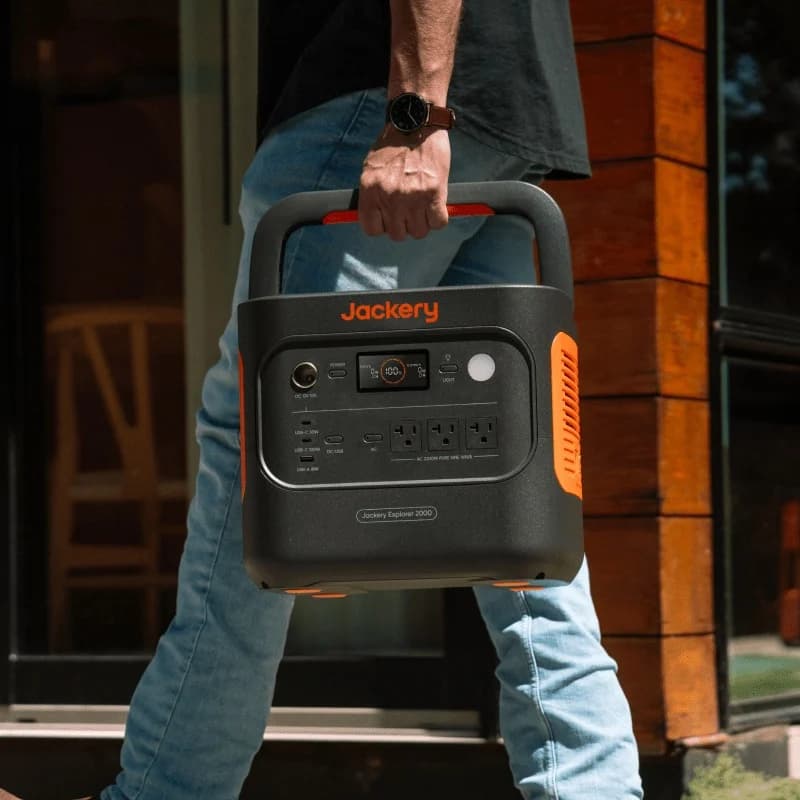
Compare Anker C2000 Gen 2 and Jackery 2000 v2 for fridge backup, carrying, expansion and solar. Get runtime estimates, complete kit checks and buying picks.