

Comparison
Tesla Universal Wall Connector vs Wall Connector
Which Fits Your EVs?
Choose the right Tesla Wall Connector for your household's EV ports, with charging limits, cable reach, power sharing and Powershare requirements explained.
By thisWATT EditorialUpdated November 3, 20268 min read
On this page · Quick picks: start with the cars, then the parking
Choose the Tesla Universal Wall Connector for a household that uses both NACS and J1772 charge ports; its docked adapter saves handling a separate adapter when you switch cars. Choose the standard US Gen 3 Wall Connector for a Tesla-only household: both reach 48A / 11.5kW at 240V, so Universal's advantage is connector convenience, with the same charging ceiling (Universal manual, Gen 3 manual).
This US comparison was checked on November 2, 2026. Recommendations below are based on official documents; thisWATT has not physically evaluated these chargers.
Quick picks: start with the cars, then the parking
Compare specifications and all conditions
One Tesla, or Teslas sharing a charger
- Our choice
- Standard Gen 3 Wall Connector
- What decides it
- No need for Universal's J1772 adapter
A Tesla and a J1772-port EV
- Our choice
- Universal Wall Connector
- What decides it
- Change connector at the dock when switching vehicles
J1772 today, likely NACS later
- Our choice
- Universal Wall Connector
- What decides it
- Both AC connector options are already included
J1772 only, with no need to change connector
- Our choice
- Emporia Classic J1772
- What decides it
- A direct J1772 cable; consider its plug-in option if appropriate
Both vehicles must charge simultaneously
- Our choice
- Separate chargers, planned as a system
- What decides it
- Universal still has a single charging cable
Full comparison table
Swipe to compare. Row labels stay visible.
| Your household | Our choice | What decides it |
|---|---|---|
| One Tesla, or Teslas sharing a charger | Standard Gen 3 Wall Connector | No need for Universal's J1772 adapter |
| A Tesla and a J1772-port EV | Universal Wall Connector | Change connector at the dock when switching vehicles |
| J1772 today, likely NACS later | Universal Wall Connector | Both AC connector options are already included |
| J1772 only, with no need to change connector | Emporia Classic J1772 | A direct J1772 cable; consider its plug-in option if appropriate |
| Both vehicles must charge simultaneously | Separate chargers, planned as a system | Universal still has a single charging cable |
Scroll horizontally to see every column
| Your household | Our choice | What decides it |
|---|---|---|
| One Tesla, or Teslas sharing a charger | Standard Gen 3 Wall Connector | No need for Universal's J1772 adapter |
| A Tesla and a J1772-port EV | Universal Wall Connector | Change connector at the dock when switching vehicles |
| J1772 today, likely NACS later | Universal Wall Connector | Both AC connector options are already included |
| J1772 only, with no need to change connector | Emporia Classic J1772 | A direct J1772 cable; consider its plug-in option if appropriate |
| Both vehicles must charge simultaneously | Separate chargers, planned as a system | Universal still has a single charging cable |
These are our buying judgments from the connector arrangements described in the manuals. Check the actual charge port, rather than choosing from the car's badge or a planned replacement alone. For a non-Tesla NACS vehicle, confirm that exact vehicle's AC compatibility with Tesla and its automaker before choosing the standard unit.
Tesla Universal vs standard: the useful differences
The long-cable versions compared here both have a 24-ft cable. Tesla's Gen 3 specifications and Universal manual give the following figures; output is a maximum, not a promise for every car.
Vehicle end
- Universal Wall Connector, US
- NACS handle with docked J1772 adapter
- Standard Gen 3 Wall Connector, US NACS
- NACS handle; no integrated J1772 adapter
Maximum output at 240V
- Universal Wall Connector, US
- 48A / 11.5kW
- Standard Gen 3 Wall Connector, US NACS
- 48A / 11.5kW
Connection to house
- Universal Wall Connector, US
- Hardwired
- Standard Gen 3 Wall Connector, US NACS
- Hardwired
Cable covered here
- Universal Wall Connector, US
- 24 ft
- Standard Gen 3 Wall Connector, US NACS
- 24 ft
Wi-Fi
- Universal Wall Connector, US
- 2.4 GHz
- Standard Gen 3 Wall Connector, US NACS
- 2.4 GHz
Enclosure in manual
- Universal Wall Connector, US
- Type 3R / IP54
- Standard Gen 3 Wall Connector, US NACS
- Type 3R / IP54
Normal personal-use limited warranty
- Universal Wall Connector, US
- 48 months, subject to terms
- Standard Gen 3 Wall Connector, US NACS
- 48 months, subject to terms
Safety approval stated in manual
- Universal Wall Connector, US
- ETL/cETL; datasheet conflict discussed below
- Standard Gen 3 Wall Connector, US NACS
- cULus, E351001
Powershare Gateway route
- Universal Wall Connector, US
- Specified with Cybertruck
- Standard Gen 3 Wall Connector, US NACS
- Not the connector specified for this route
Powerwall 3 Powershare route
- Universal Wall Connector, US
- Supported with an eligible vehicle
- Standard Gen 3 Wall Connector, US NACS
- Supported with an eligible vehicle
Full comparison table
Swipe to compare. Row labels stay visible.
| Decision point | Universal Wall Connector, US | Standard Gen 3 Wall Connector, US NACS |
|---|---|---|
| Vehicle end | NACS handle with docked J1772 adapter | NACS handle; no integrated J1772 adapter |
| Maximum output at 240V | 48A / 11.5kW | 48A / 11.5kW |
| Connection to house | Hardwired | Hardwired |
| Cable covered here | 24 ft | 24 ft |
| Wi-Fi | 2.4 GHz | 2.4 GHz |
| Enclosure in manual | Type 3R / IP54 | Type 3R / IP54 |
| Normal personal-use limited warranty | 48 months, subject to terms | 48 months, subject to terms |
| Safety approval stated in manual | ETL/cETL; datasheet conflict discussed below | cULus, E351001 |
| Powershare Gateway route | Specified with Cybertruck | Not the connector specified for this route |
| Powerwall 3 Powershare route | Supported with an eligible vehicle | Supported with an eligible vehicle |
Scroll horizontally to see every column
| Decision point | Universal Wall Connector, US | Standard Gen 3 Wall Connector, US NACS |
|---|---|---|
| Vehicle end | NACS handle with docked J1772 adapter | NACS handle; no integrated J1772 adapter |
| Maximum output at 240V | 48A / 11.5kW | 48A / 11.5kW |
| Connection to house | Hardwired | Hardwired |
| Cable covered here | 24 ft | 24 ft |
| Wi-Fi | 2.4 GHz | 2.4 GHz |
| Enclosure in manual | Type 3R / IP54 | Type 3R / IP54 |
| Normal personal-use limited warranty | 48 months, subject to terms | 48 months, subject to terms |
| Safety approval stated in manual | ETL/cETL; datasheet conflict discussed below | cULus, E351001 |
| Powershare Gateway route | Specified with Cybertruck | Not the connector specified for this route |
| Powerwall 3 Powershare route | Supported with an eligible vehicle | Supported with an eligible vehicle |
- 48AMaximum charging current for either Tesla model
- 24 ftCable length of the versions compared here
Best for mixed ports: Tesla Universal Wall Connector
Universal's benefit is easy to picture: charge the Tesla with the NACS handle, then use the docked J1772 adapter for the other car. Tesla's manual describes pressing the adapter's black release button to take out the J1772 handle. Both choices use the same cable, so plan to alternate cars if you install only this unit.
This is the 1734412 family. The Tesla datasheet distinguishes the 1734412-02-X, 24-ft version from a 1734412-03-X, 13.1-ft version. The latter is an identification warning from an older document, not a current availability claim. Match the cable length before ordering.
If a J1772 car is likely to stay in the household, this is our Tesla pick. If you already have a working charger and compatible adapter, assess whether storing the adapter in the dock solves a real daily inconvenience before replacing the charger. The matching output ratings provide no reason to expect a speed upgrade by themselves.
See Universal Wall Connector at Tesla
Best for a Tesla-only household: standard Gen 3 Wall Connector
The standard US model covered here is the 1457768 family identified in Tesla's North American manual. It keeps the same charging ceiling and cable reach without Universal's docked J1772 adapter. Do not substitute a different regional connector or an older-generation Wall Connector merely because the name looks similar. Tesla's separate J1772 Wall Connector manual identifies the 1509549 family; distinguish that model from Universal's adapter-equipped arrangement.
Access control deserves attention if other vehicles will visit. Tesla's current access-control documentation offers All Vehicles, Only Teslas and Authorized Teslas Only. A setting that excludes a visitor can prevent a session even when the connector is appropriate; it is separate from physical compatibility.
Choose Universal instead if you want its built-in J1772 arrangement. Leave separate adapter selection, adapter direction and public fast-charging questions to our NACS and J1772 adapter guide.
See standard Wall Connector at Tesla
Charging speed: the car and installation set the result
Tesla explicitly says actual charging depends on Wall Connector output and the vehicle's onboard charger. Both manuals list 40A / 9.6kW and 32A / 7.6kW at 240V as lower configured outputs. Those are Tesla's rounded table values; fitting Universal does not remove an installation limit or change the vehicle's onboard hardware.
Ask a licensed electrician to assess the available capacity and charging requirement before ordering; hardwired chargers need professional installation and a permit where required. Get the proposed charging output in the quote, rather than assuming the maximum printed on the box. Both Tesla manuals prohibit cord-and-plug connections, so neither is an outlet-ready alternative to a portable charger.
One charger or a group: what power management actually does
Tesla's manuals distinguish three jobs. Static management fixes the installer's maximum charging setting. Dynamic management varies charging according to other household loads and requires a separately sold Tesla-approved meter; the Universal manual supports a single Wall Connector on a split-phase system for this feature. Group management shares the site's allocated power between chargers.
The Gen 3 group manual and Universal manual describe up to six Wall Connectors communicating over Wi-Fi. Their combined draw stays within the group's allocation. Two cars charging together therefore share available power; adding another connector does not create more electrical capacity.
Use a single Universal if taking turns suits your parking routine. Consider separate chargers if moving a cable or swapping cars would be a recurring problem. Have the installer specify the supported management arrangement: Tesla's Powershare system table says Dynamic and Group Power Management are unavailable when installing Universal Wall Connector for Powershare.
Powershare: choose the complete system before the connector
A Universal Wall Connector alone is not home backup. Tesla's system manual revision 1.27, dated October 6, 2026, updated the Powerwall configuration guidance (revision history). Its current table separates these routes:
Cybertruck with Powershare Gateway
- Connector decision
- Universal Wall Connector required
- Feature status in Tesla's table
- Available
Powerwall 3 with an eligible Cybertruck, Model 3 or Model Y
- Connector decision
- Universal or standard Gen 3 Wall Connector
- Feature status in Tesla's table
- Available
Powerwall 2 or Powerwall+
- Connector decision
- Universal or standard Gen 3 hardware can be installed
- Feature status in Tesla's table
- Powershare coming soon
Full comparison table
Swipe to compare. Row labels stay visible.
| Home equipment and vehicle | Connector decision | Feature status in Tesla's table |
|---|---|---|
| Cybertruck with Powershare Gateway | Universal Wall Connector required | Available |
| Powerwall 3 with an eligible Cybertruck, Model 3 or Model Y | Universal or standard Gen 3 Wall Connector | Available |
| Powerwall 2 or Powerwall+ | Universal or standard Gen 3 hardware can be installed | Powershare coming soon |
Scroll horizontally to see every column
| Home equipment and vehicle | Connector decision | Feature status in Tesla's table |
|---|---|---|
| Cybertruck with Powershare Gateway | Universal Wall Connector required | Available |
| Powerwall 3 with an eligible Cybertruck, Model 3 or Model Y | Universal or standard Gen 3 Wall Connector | Available |
| Powerwall 2 or Powerwall+ | Universal or standard Gen 3 hardware can be installed | Powershare coming soon |
For Model 3 and Model Y, Tesla's table explicitly includes vehicles ordered in the US and Puerto Rico after October 1, 2026 when paired with Powerwall. It directs owners of other vehicles to confirm capability through Tesla. Have Tesla verify the exact vehicle and system; a model name alone is insufficient.
The Powerwall application note also requires the Wall Connector and Powerwall to share a Wi-Fi network and says not to install Powershare Gateway with Powerwall. Ask a licensed installer to confirm eligibility, equipment and commissioning before choosing either charger for backup. Compare broader options in our home battery backup guide.
Cable reach, outdoor use and app access
Plan the cable path to each car's actual port, including how you normally park. Both Tesla manuals specify Type 3R / IP54 enclosures and an operating range of -22°F to 122°F. Outdoor suitability does not remove Tesla's instructions to protect the handle from moisture and avoid damaged cables. The Gen 3 manual also explicitly prohibits extension sets.
Both list 2.4 GHz Wi-Fi. Universal's manual describes customer registration in the Tesla app and commissioning through Tesla One. Standard Gen 3's current access-control page also allows owners to add authorized vehicles in the Tesla app. Arrange owner access and usable Wi-Fi coverage as part of the installer handover.
Match the ports
Check both current vehicles and any replacement you are actually planning to buy.
Check the parking
Walk the proposed cable path to each port and include normal parking variation.
Confirm the system
Ask the electrician for the charging output and management plan; ask Tesla to confirm Powershare eligibility if needed.
J1772 alternative on Amazon: Emporia Classic
If your household needs J1772 and you prefer a dedicated connector, Emporia Classic J1772 is a fair alternative. Its official spec sheet lists 48A / 11.5kW hardwired, 40A / 9.6kW with NEMA 14-50, a 25-ft cable, NEMA Type 4 enclosure and UL 2594 safety certification, file E528156. Confirm the installation configuration when selecting the listing.
Emporia's product page provides app scheduling and says Classic's PowerSmart load management is an additional upgrade. It therefore is not a like-for-like replacement for every Tesla management or backup configuration. For more connector and equipment choices, see our Level 2 charger guide.
NACS alternative on Amazon: Emporia Classic
The NACS Classic has the same stated output and cable length, with a dedicated NACS connector instead of the docked adapter arrangement. Emporia's spec sheet describes a built-in UHF sensor that opens the Tesla charge port. Choose the connector that suits your actual vehicles; the NACS and J1772 versions are separate variants.
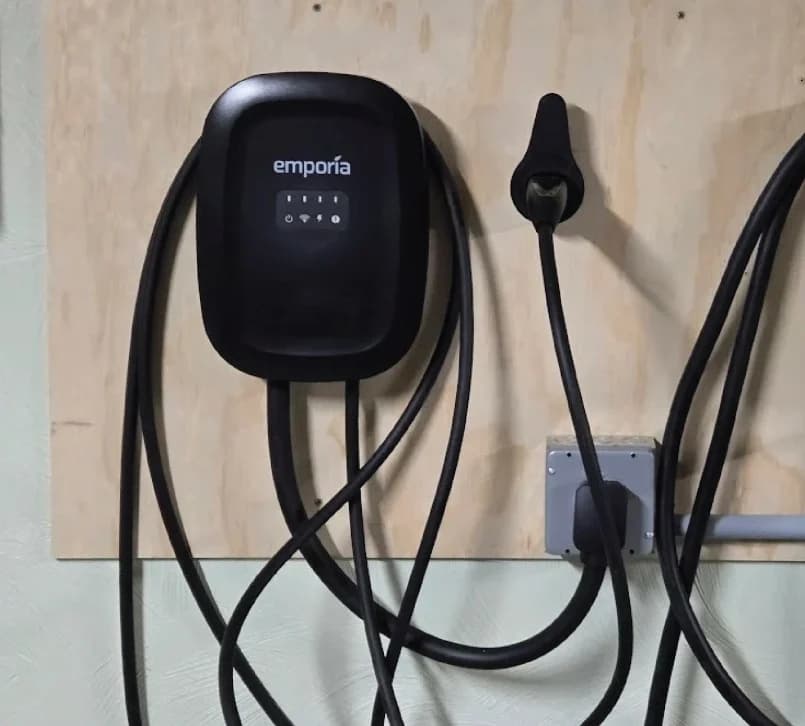
Emporia
Emporia Classic Level 2 EV Charger (NACS, 48A)
A 48A (11.5kW) ENERGY STAR smart Level 2 home charger with a NACS (SAE J3400) connector that opens the Tesla charge port, a 25-ft cable and NEMA Type 4 enclosure.
- 48 A max
- 11.5 kW max
- NACS (J3400)
Choose Universal when changing between port types on the same cable is the benefit you want. Choose the appropriate Classic when its dedicated connector, app scheduling or plug-in configuration better fits the installation.
How we choose
We compare official US/North American manuals, specifications and system tables: port fit, configured output, cable reach, safety approvals and the equipment required for extra features. These are document-based recommendations; we make no claims about measured charging speed or long-term reliability. Existing verified Emporia product records are reused, while Tesla purchase links go to the maker.
For backup, use the dated configuration table and Powerwall application note linked above rather than inferring eligibility from the charger name. We exclude promised future Powerwall features from the purchase recommendation.
Verdict
Buy Universal for mixed NACS/J1772 use; choose standard Gen 3 for a Tesla-only household. Their matching maximum output makes port convenience the deciding advantage. For simultaneous charging or home backup, settle the complete vehicle-and-home configuration first; for a dedicated connector or plug-in option, compare the appropriate Emporia Classic.
Frequently asked questions
Is the Tesla Universal Wall Connector faster than the standard Wall Connector?
No. Both have a maximum output of 48A and 11.5kW at 240V in Tesla's manuals. Actual charging also depends on the installation's configured output and the vehicle's onboard AC charger. Universal adds a docked J1772 adapter to its NACS handle; that connector choice does not raise the charging ceiling.
Can a Universal Wall Connector charge two cars at once?
No. Its NACS handle and docked J1772 adapter use the same charging cable. You choose the connector needed for the car being charged. For simultaneous charging, plan separate chargers with your electrician. Tesla's Group Power Management can share an available power allowance among multiple Wall Connectors, rather than supplying each with unrestricted power.
Does the Universal Wall Connector include a J1772 adapter?
Yes. Tesla's manual describes a NACS handle and a J1772 adapter stored in the dock. To use J1772, press the adapter's black release button and remove the handle with the adapter. This is an AC home-charging arrangement; use the exact vehicle's compatibility guidance rather than treating the word Universal as a guarantee of every charging use.
Do I need the Universal Wall Connector for Powershare?
It depends on the home system. Tesla specifies Universal Wall Connector with Powershare Gateway and Cybertruck for that route. Its current configuration table also allows a standard Gen 3 Wall Connector with Powerwall 3 and an eligible vehicle. Powerwall 2 and Powerwall+ are listed as coming soon. Have Tesla confirm the complete configuration before buying for backup.
Can either Tesla Wall Connector plug into a NEMA 14-50 outlet?
The Tesla manuals specify hardwired connections and prohibit cord-and-plug installation. Have a licensed electrician assess the installation and obtain a permit where required. If a plug-in charger is the better fit, Emporia Classic offers a NEMA 14-50 configuration limited to 40A; its 48A maximum requires hardwiring.
Related guides
Best picks · Level 2 EV Chargers
Best Home EV Chargers for Subaru Solterra: 25-ft Picks by Year
Choose a home charger for your US Solterra by model year, connector and actual cable reach. Compare verified 25-ft options, shorter alternatives and setup.
Best picks · Level 2 EV Chargers
Best Home Chargers for Tesla Model Y: Buy for Your Daily Miles
Choose a Tesla Model Y home charger by vehicle limits, daily miles and parking reach. Compare Tesla, Emporia and Home Flex, or keep your Mobile Connector.
Best picks · Level 2 EV Chargers
Best Home EV Chargers for BMW iX: Keep the Cord or Buy?
Choose a home EV charger for your BMW iX: when to keep the BMW cord, which J1772 wall chargers to buy, and how to check model year, supply and overnight needs.