

Comparison
Grizzl-E Classic vs Smart vs Classic Connect
Which to Buy?
Choose the right Grizzl-E charger: Classic, Smart or Classic Connect. Compare model codes, app generations, offline charging, cable reach and utility checks.
By thisWATT EditorialUpdated November 3, 20268 min read1 pick
Our recommendation: Grizzl-E Classic 40A Level 2 EV Charger (J1772, NEMA 14-50)
Best for app-free charging
Limit: 40A maximum (no 48A hardwired version of the Classic)
On this page · Our picks at a glance
Our picks at a glance
- 1
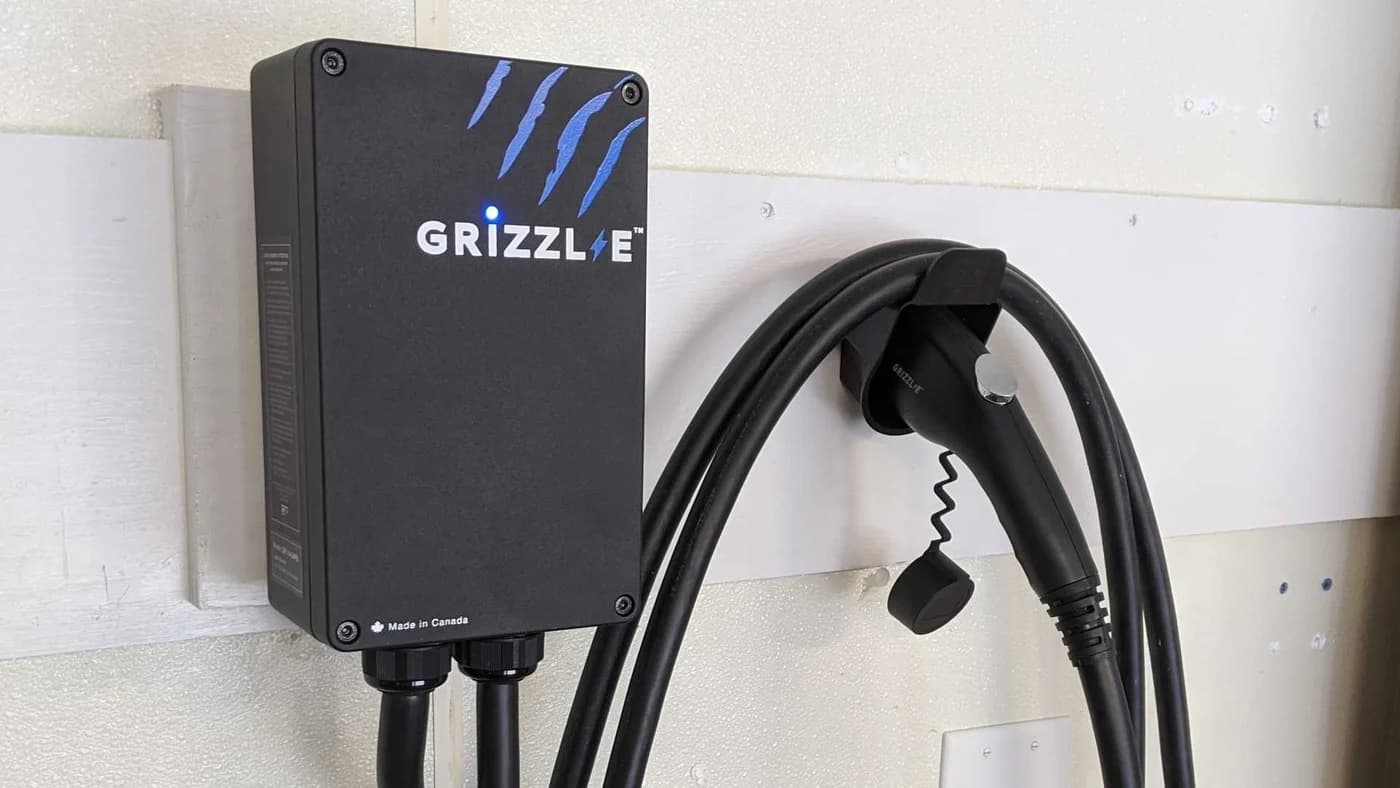
Grizzl-E Classic 40A Level 2 EV Charger (J1772, NEMA 14-50)
Choose for: Best for app-free charging
Check before buying: 40A maximum (no 48A hardwired version of the Classic)
Choose Grizzl-E Classic for straightforward, app-free charging; choose Classic Connect for charger-side schedules, charging history and remote control. An older Grizzl-E Smart Level 2 electric vehicle charger needs a manufacturing-date check before you choose an app or follow setup instructions. All have a 40A maximum, so connected features alone do not make charging faster. Sources: Classic, Classic Connect, Smart manuals.
Quick picks
- Buy Classic if you want to plug in without managing a charger account, or your vehicle already provides the timer you need.
- Buy Classic Connect if you want charger schedules, usage history or remote controls. Select the vehicle connector explicitly: J1772 and NACS are separate versions.
- Keep a working Classic if its output, connector and reach already meet your needs. An app label alone is no reason to replace it.
- Treat older Smart listings cautiously. The maker's Smart page showed Out of stock when checked November 2, 2026. We are not making it a new-purchase pick without confirmed stock and revision.
For alternatives across brands, use our Level 2 charger guide. This page resolves the Grizzl-E version names.
Read the label: Classic, Smart and Connect are different names
Grizzl-E Connect is an app name; Classic Connect is a charger model. The app name alone cannot identify the hardware. The official manual index separately lists Classic, Classic Connect and Smart, including both ChargeLab and Connect manuals for Smart.
Classic, black, J1772, NEMA 14-50
- Label or order-code check
- GR1-14-24-PB
- App/manual to start with
- Classic manual; no charger app
Smart Version 1
- Label or order-code check
- GRS-14-24-P family; manufactured before July 5, 2023
- App/manual to start with
- ChargeLab manual, revision 14.0
Smart Version 2
- Label or order-code check
- GRS-14-24-PB and related codes; manufactured after July 5, 2023
- App/manual to start with
- Smart Connect manual, revision 2.9
Classic Connect, black, J1772
- Label or order-code check
- SKU GRS-14-25J1772-B; model GRS-077-W-14-25J40-A-GB
- App/manual to start with
- Classic Connect installation manual and Grizzl-E Connect app guide
Classic Connect, black, NACS
- Label or order-code check
- SKU GRS-14-25NACS-B; model GRS-077-W-14-25N40-A-GB
- App/manual to start with
- Same Classic Connect manual; different vehicle connector
Full comparison table
Swipe to compare. Row labels stay visible.
| Hardware or generation | Label or order-code check | App/manual to start with |
|---|---|---|
| Classic, black, J1772, NEMA 14-50 | GR1-14-24-PB | Classic manual; no charger app |
| Smart Version 1 | GRS-14-24-P family; manufactured before July 5, 2023 | ChargeLab manual, revision 14.0 |
| Smart Version 2 | GRS-14-24-PB and related codes; manufactured after July 5, 2023 | Smart Connect manual, revision 2.9 |
| Classic Connect, black, J1772 | SKU GRS-14-25J1772-B; model GRS-077-W-14-25J40-A-GB | Classic Connect installation manual and Grizzl-E Connect app guide |
| Classic Connect, black, NACS | SKU GRS-14-25NACS-B; model GRS-077-W-14-25N40-A-GB | Same Classic Connect manual; different vehicle connector |
Scroll horizontally to see every column
| Hardware or generation | Label or order-code check | App/manual to start with |
|---|---|---|
| Classic, black, J1772, NEMA 14-50 | GR1-14-24-PB | Classic manual; no charger app |
| Smart Version 1 | GRS-14-24-P family; manufactured before July 5, 2023 | ChargeLab manual, revision 14.0 |
| Smart Version 2 | GRS-14-24-PB and related codes; manufactured after July 5, 2023 | Smart Connect manual, revision 2.9 |
| Classic Connect, black, J1772 | SKU GRS-14-25J1772-B; model GRS-077-W-14-25J40-A-GB | Classic Connect installation manual and Grizzl-E Connect app guide |
| Classic Connect, black, NACS | SKU GRS-14-25NACS-B; model GRS-077-W-14-25N40-A-GB | Same Classic Connect manual; different vehicle connector |
Sources: Classic manual, Smart Version 1, Smart Version 2, Connect order options.
The Smart manuals reuse model-code families, making the MFG date essential. Their wording says before/after the cutoff; if the label is dated on the cutoff itself, have support identify it. Black, Avalanche White and Extreme Camo describe finishes in the older families; Classic Connect offers black or white and a separate connector choice. Do not infer connectivity from enclosure color.
Read the label
Get the full model code, manufacturing date and selected condition.
Match the manual
Separate Classic, Smart's app generation and Classic Connect.
Match both ends
Confirm the supply plug and the connector that enters your vehicle.
Best for app-free charging: Grizzl-E Classic
The recorded pick is the black J1772 Classic, GR1-14-24-PB, with a NEMA 14-50 plug. Its manual specifies 40A / 9.6kW maximum, adjustable limits of 32A, 24A and 16A, and UL listing. The product page identifies the aluminum enclosure as UL Type 4 indoor/outdoor, with certification file E510712.
Grizzl-E
Grizzl-E Classic 40A Level 2 EV Charger (J1772, NEMA 14-50)
A non-smart, 40A Level 2 home charger in an aluminum UL Type 4 enclosure with a 24-ft J1772 cable, a NEMA 14-50 plug and switchable current limits, made in Canada by United Chargers.
Check package and model options
- 40 A max
- 9.6 kW max
- J1772
The limitation is straightforward: the specification says No Internet Connection. There is no charger-side app scheduling, usage history or remote disable control. If your vehicle's manual provides a suitable charging timer, that is a reason to keep the charger simple.
The Classic page also displays an “Always connected” scheduling banner. That conflicts with its own no-internet specification; do not buy Classic expecting those advertised app functions.
Check price on Amazon. Match the black J1772 NEMA 14-50 version before ordering.
Best for connected controls: Grizzl-E Classic Connect
Classic Connect is the current connected choice here. Its model-specific manual specifies a 25 ft cable, NEMA 14-50 input, 40A / 9.60kW maximum and 2.4GHz Wi-Fi. The product specification lists UL/cUL E510712 and a UL Type 4 indoor/outdoor enclosure.
Choose J1772 black, SKU GRS-14-25J1772-B, for that vehicle inlet; choose NACS black, SKU GRS-14-25NACS-B, for a NACS inlet. White finish options also exist. Check the inlet on your exact vehicle instead of relying on a broad brand-compatibility claim; our EV adapter guide explains the separate adapter decision.
The Connect app guide documents charging history export, schedules and Charge Now, Scheduled and Disabled modes. Those controls justify choosing Connect when you want the charger to manage charging. They add network setup and account management to ownership.
Choose the connector and check availability at United Chargers.
Older Grizzl-E Smart: identify it before buying or changing apps
The Smart page remains online, and the maker still publishes both Smart manuals. That is documentation availability, not a promise of future cloud support or proof that a particular leftover listing is supported.
Version 1's manual names ChargeLab; Version 2's names Grizzl-E Connect. Meanwhile, the current general FAQ directs Smart owners to Connect without that date distinction. For an earlier unit, send United Chargers the serial number and MFG-label photo before assuming an app migration is available. We found no serial-specific migration authorization in the documents cited here.
The setup paths also differ: Version 1 documents a UC_Smart_ network prefix, while the later Smart connection guide uses the serial number as the network name. Follow the matching generation's manual. A generic instruction to install the latest app cannot resolve that difference.
Hardware comparison: charging output, plugs and cable reach
Classic
- Lower hardware current limits
- 32A, 24A, 16A
- Maximum output in the manuals
- 40A / 9.6kW
- Vehicle connector
- J1772
All specifications
- Supply plug
- Recorded pick: NEMA 14-50; manual also covers 6-50
- Cable reach
- 24 ft for recorded model in manual; page says 25 ft
- Enclosure, per product pages
- Aluminum, UL Type 4 indoor/outdoor
- Maker's safety listing
- UL E510712
- Connectivity
- None
Older Smart
- Lower hardware current limits
- 32A, 24A, 16A
- Maximum output in the manuals
- 40A / 9.6kW
- Vehicle connector
- J1772
All specifications
- Supply plug
- NEMA 14-50 or 6-50
- Cable reach
- V1: 24 ft; V2: 24 ft in introduction, 25 ft in specification table
- Enclosure, per product pages
- Aluminum, UL Type 4 indoor/outdoor
- Maker's safety listing
- UL E510712
- Connectivity
- 2.4GHz Wi-Fi
Classic Connect
- Lower hardware current limits
- 32A, 24A, 16A
- Maximum output in the manuals
- 40A / 9.60kW
- Vehicle connector
- Select J1772 or NACS
All specifications
- Supply plug
- NEMA 14-50
- Cable reach
- 25 ft in manual and product page
- Enclosure, per product pages
- Aluminum alloy, UL Type 4 indoor/outdoor
- Maker's safety listing
- UL/cUL E510712
- Connectivity
- 2.4GHz Wi-Fi
Full comparison table
Swipe to compare. Row labels stay visible.
| Specification | Classic | Older Smart | Classic Connect |
|---|---|---|---|
| Maximum output in the manuals | 40A / 9.6kW | 40A / 9.6kW | 40A / 9.60kW |
| Lower hardware current limits | 32A, 24A, 16A | 32A, 24A, 16A | 32A, 24A, 16A |
| Vehicle connector | J1772 | J1772 | Select J1772 or NACS |
| Supply plug | Recorded pick: NEMA 14-50; manual also covers 6-50 | NEMA 14-50 or 6-50 | NEMA 14-50 |
| Cable reach | 24 ft for recorded model in manual; page says 25 ft | V1: 24 ft; V2: 24 ft in introduction, 25 ft in specification table | 25 ft in manual and product page |
| Enclosure, per product pages | Aluminum, UL Type 4 indoor/outdoor | Aluminum, UL Type 4 indoor/outdoor | Aluminum alloy, UL Type 4 indoor/outdoor |
| Maker's safety listing | UL E510712 | UL E510712 | UL/cUL E510712 |
| Connectivity | None | 2.4GHz Wi-Fi | 2.4GHz Wi-Fi |
Scroll horizontally to see every column
| Specification | Classic | Older Smart | Classic Connect |
|---|---|---|---|
| Maximum output in the manuals | 40A / 9.6kW | 40A / 9.6kW | 40A / 9.60kW |
| Lower hardware current limits | 32A, 24A, 16A | 32A, 24A, 16A | 32A, 24A, 16A |
| Vehicle connector | J1772 | J1772 | Select J1772 or NACS |
| Supply plug | Recorded pick: NEMA 14-50; manual also covers 6-50 | NEMA 14-50 or 6-50 | NEMA 14-50 |
| Cable reach | 24 ft for recorded model in manual; page says 25 ft | V1: 24 ft; V2: 24 ft in introduction, 25 ft in specification table | 25 ft in manual and product page |
| Enclosure, per product pages | Aluminum, UL Type 4 indoor/outdoor | Aluminum, UL Type 4 indoor/outdoor | Aluminum alloy, UL Type 4 indoor/outdoor |
| Maker's safety listing | UL E510712 | UL E510712 | UL/cUL E510712 |
| Connectivity | None | 2.4GHz Wi-Fi | 2.4GHz Wi-Fi |
Sources: the Classic, Smart and Classic Connect pages and their model-specific manuals above.
Cable contradictions matter near a reach limit. Have the seller confirm the actual cable supplied; do not resolve the Classic or Smart discrepancy by rounding. The product pages also label maximum power 10kW, while the manuals specify 9.6kW at the maximum current. Use the manual's output figure when comparing these versions.
Have a licensed electrician assess the available circuit and current setting. The manuals pair maximum output with a 50A circuit; the plug's name alone does not confirm your installation can supply it. Hardwired EV chargers need a licensed electrician and a permit where required. The manuals prohibit extension cords and electrical adapters on the supply connection.
Setup and schedules: use the right app path
For Classic, there is no network pairing. For Classic Connect, its manual directs you to the app's Connect via Wi-Fi flow. For a compatible Smart using Connect, the current app guide explicitly says Smart cannot use that flow: select Enter Serial Number, then use the generation's browser-based Wi-Fi configuration instructions.
Both connected families require 2.4GHz, rather than 5GHz. The Smart connection guide specifies −67dBm or greater signal strength at the charger. Classic Connect's manual gives a corresponding −67 RSSI check and warns that mesh-network setup can need a separate band. Check coverage where the charger will sit before choosing it for remote controls.
For scheduling, the current app guide supports selected days and start/end times. It requires Scheduled mode to activate the schedule, and uses the charger's time zone to calculate timing. Entering electricity rates and activating a charging schedule are separate actions. Our recommendation: start with one scheduling authority, the car or charger, and confirm an ordinary overnight session before relying on it for a deadline.
If dependable off-peak timing through internet outages is essential, obtain a hardware-and-firmware-specific answer from support before buying. For an existing connected unit, check whether the app shows Disabled, Scheduled or a fault before treating a failure to start as a Wi-Fi problem; those are separately documented states.
Utility programs: Wi-Fi does not establish eligibility
Check the utility's exact model and enrollment route before paying for connected features. For example, National Grid's Charge Smart NY page currently lists compatible home chargers without Grizzl-E among them, but also offers enrollment through compatible vehicle telematics. It says only a compatible EV or charger is needed, not both. That makes a vehicle-based route worth checking before replacing a working Classic.
- Yes: Match the exact charger model or vehicle to the program's current compatibility list
- Yes: Confirm the required utility account, rate and enrollment method
- Partly: Vehicle-based enrollment may avoid needing a compatible connected charger
- No: Do not treat an app, Wi-Fi or an OCPP label as utility approval
Ask whether the program connects through the car or charger, which backend it accepts, and whether ongoing connectivity is required. An equipment rebate and participation in managed charging are separate questions; get confirmation for the benefit you actually want. The manufacturer's incentives directory is a starting point, while the utility's current terms settle enrollment.
How we choose
We compare official US product specifications, generation-specific manuals, the current Connect app guide and United Chargers' support guidance. The utility example comes from the utility itself. This is a document-based comparison; we have not physically evaluated these chargers. We retain the existing Classic product record, use maker links for Classic Connect, and leave uncertain cable lengths and older-app migration visible. Commissions do not determine our recommendations (disclosure).
Verdict
Buy Classic for simplicity; buy Classic Connect for connected controls or its native NACS option. Keep a working Classic when it already meets your charging needs. For an older Smart, identify the manufacturing date and supported app first; buy leftover stock only after the exact revision, support and warranty are confirmed. None of these app choices raises the shared 40A ceiling.
Frequently asked questions
What is the difference between Grizzl-E Classic and Smart?
Classic has no internet connection. Smart adds Wi-Fi and app features, but its manufacturing date matters: the maker assigns units before July 5, 2023 to the ChargeLab manual and units after that date to its Grizzl-E Connect manual. Classic Connect is separately identified hardware with its own manual. All three families have a 40A maximum; buying app features does not increase that ceiling.
Does Grizzl-E Smart work without Wi-Fi?
United Chargers says Smart can charge without Wi-Fi by following the vehicle's instructions, while its app and smart features become unavailable. The current FAQ also permits Classic Connect to operate without connecting. That does not establish that every saved schedule or remote setting works through an outage. Confirm offline behavior for your hardware and firmware if an off-peak deadline is essential.
Which app does Grizzl-E Smart use?
Start with the manufacturing date and matching manual rather than a generic app recommendation. The older Smart manual names ChargeLab; the later Smart manual names Grizzl-E Connect. The current Connect app guide says Smart must use Enter Serial Number instead of Connect via Wi-Fi. For an older unit, ask United Chargers to confirm the supported app or migration path for its serial number.
Can I turn a Grizzl-E Classic into a Smart with an app?
Treat Classic as app-free hardware: its specification says No Internet Connection, and the maker describes Smart as having an additional Wi-Fi module. Installing Grizzl-E Connect on a phone does not establish hardware compatibility. Keep a working Classic if its charging function meets your needs; select Classic Connect when you specifically want supported charger-side scheduling, monitoring or remote control.
Is Grizzl-E Classic Connect a NEMA 14-50 EV charger?
Yes. The US Classic Connect specification lists a NEMA 14-50 supply plug and a choice of J1772 or NACS vehicle connectors. The manual gives a 40A maximum and 9.60kW output with the appropriate supply. The wall plug and vehicle connector are separate selections. Have a licensed electrician assess the circuit and any hardwired installation, with a permit where required.
Grizzl-E Classic 40A Level 2 EV Charger (J1772, NEMA 14-50)
AmazonRelated guides
Best picks · Level 2 EV Chargers
Best Home EV Chargers for BMW iX: Keep the Cord or Buy?
Choose a home EV charger for your BMW iX: when to keep the BMW cord, which J1772 wall chargers to buy, and how to check model year, supply and overnight needs.
Best picks · Level 2 EV Chargers
Best Home EV Chargers for Subaru Solterra: 25-ft Picks by Year
Choose a home charger for your US Solterra by model year, connector and actual cable reach. Compare verified 25-ft options, shorter alternatives and setup.
Best picks · Level 2 EV Chargers
Best Home Chargers for Tesla Model Y: Buy for Your Daily Miles
Choose a Tesla Model Y home charger by vehicle limits, daily miles and parking reach. Compare Tesla, Emporia and Home Flex, or keep your Mobile Connector.